There is a slight benefit to changing SSH from listening on the standard port 22 to a different unused port. This security by obscurity will avoid the amateur hacker's automated scans but will not fool serious attempts to discover an SSH server. Whichever port SSH is running on, enforce a rate limit to perform simple throttling on incoming connections.
Set a low limit for the maximum number of authentication attempts permitted per connection to protect against brute-force attacks. This prevents an attacker from port scanning a system for potentially exploitable services. Without the correct knock sequence, protected ports will appear closed. Another possibility is to enforce the use of a bastion host so all other incoming SSH connections are automatically blocked. ■Stateful inspection Stateful inspection operates at the network and the transport layers of the OSI model, but it has the ability to monitor state information regarding a connection.

In effect, when a connection is established between two hosts, the firewall will initially determine if the connection is allowable based on a set of rules about source and destination ports and IP addresses. Once the connection is deemed to be acceptable, the firewall remembers this. Therefore, subsequent traffic can be examined as either permissible or not within the context of the entire session. It then functions by checking each packet to verify that it is an expected response to a current communications session.
TCP connect scan is the default TCP scan type when SYN scan is not an option. This is the case when a user does not have raw packet privileges. Instead of writing raw packets as most other scan types do, Nmap asks the underlying operating system to establish a connection with the target machine and port by issuing the connect system call. This is the same high-level system call that web browsers, P2P clients, and most other network-enabled applications use to establish a connection. It is part of a programming interface known as the Berkeley Sockets API. Rather than read raw packet responses off the wire, Nmap uses this API to obtain status information on each connection attempt. SynproxyThis option causes pfSense to proxy incoming TCP connections.

The first packet of a TCP connection is a SYN from source, which elicits a SYN ACK response from the destination, then an ACK in return from the source to complete the handshake. Normally the host behind the firewall will handle this on its own, but synproxy state has the firewall complete this handshake instead. This helps protect against one type of Denial of Service attack, SYN floods. This is typically only used with rules on WAN interfaces.

This type of attack is best handled at the target OS level today, as every modern operating system includes capabilities of handling this on its own. Because the firewall can't know what TCP extensions the back-end host supports, when using synproxy state, it announces no supported TCP extensions. This means connections created using synproxy state will not use window scaling, SACK, nor timestamps which will lead to significantly reduced performance in most all cases. It can be useful when opening TCP ports to hosts that do not handle network abuse well, where top performance isn't a concern. A remote user will have the same access to your network as does the computer he or she is attached to. It doesn't matter how good the security of a machine is if you put an unprotected remote control program on it.

This is much more dangerous than any other service you are likely to run and should be protected appropriately. UDP scan works by sending a UDP packet to every targeted port. If an ICMP port unreachable error is returned, the port is closed. Other ICMP unreachable errors mark the port as filtered. Occasionally, a service will respond with a UDP packet, proving that it is open.

If no response is received after retransmissions, the port is classified as open|filtered. This means that the port could be open, or perhaps packet filters are blocking the communication. Version detection (-sV) can be used to help differentiate the truly open ports from the filtered ones.

When SYN scan is available, it is usually a better choice. Nmap has less control over the high level connect call than with raw packets, making it less efficient. The system call completes connections to open target ports rather than performing the half-open reset that SYN scan does. Not only does this take longer and require more packets to obtain the same information, but target machines are more likely to log the connection.

A decent IDS will catch either, but most machines have no such alarm system. Many services on your average Unix system will add a note to syslog, and sometimes a cryptic error message, when Nmap connects and then closes the connection without sending data. Truly pathetic services crash when this happens, though that is uncommon. An administrator who sees a bunch of connection attempts in her logs from a single system should know that she has been connect scanned.

Although nowadays it is not practical, when possible, server administrators should login to web servers locally. If remote access is needed, one must make sure that the remote connection is secured properly, by using tunneling and encryption protocols. Using security tokens and other single sign on equipment and software, is a very good security practice. Remote access should also be restricted to a specific number of IP's and to specific accounts only.
It is also very important not to use public computers or public networks to access corporate servers remotely, such as in internet café's or public wireless networks. SNMP assists spiteful users to learn too much about a system, making password speculations easier. SNMP is often disregarded when checking for vulnerabilities due to the User Datagram Protocol ports 161 and 162. Ensure network management servers are physically secured and secured on the network layer.

Consider utilizing a segregate management subnet, protecting it by using a router with an access list. Unless the service is required, it should be shut off by default. This eliminates the possibility of any obscure protocols being utilized, while minimizing the danger of an incident.

The key advantage to these scan types is that they can sneak through certain non-stateful firewalls and packet filtering routers. Another advantage is that these scan types are a little more stealthy than even a SYN scan. Don't count on this though—most modern IDS products can be configured to detect them. The big downside is that not all systems follow RFC 793 to the letter.

A number of systems send RST responses to the probes regardless of whether the port is open or not. Major operating systems that do this are Microsoft Windows, many Cisco devices, BSDI, and IBM OS/400. This scan does work against most Unix-based systems though.

Another downside of these scans is that they can't distinguish open ports from certain filtered ones, leaving you with the responseopen|filtered. At the same time, while you're being as specific as possible with your rule set, there are best practices you can use to make it easier on yourself. It takes advantage of the fact that SCTP implementations should silently drop packets containing COOKIE ECHO chunks on open ports, but send an ABORT if the port is closed. The advantage of this scan type is that it is not as obvious a port scan than an INIT scan. Also, there may be non-stateful firewall rulesets blocking INIT chunks, but not COOKIE ECHO chunks.

Don't be fooled into thinking that this will make a port scan invisible; a good IDS will be able to detect SCTP COOKIE ECHO scans too. The downside is that SCTP COOKIE ECHO scans cannot differentiate between open and filteredports, leaving you with the state open|filteredin both cases. Each container also gets its own network stack, meaning that a container doesn't get privileged access to the sockets or interfaces of another container. Of course, if the host system is setup accordingly, containers can interact with each other through their respective network interfaces — just like they can interact with external hosts. When you specify public ports for your containers or uselinksthen IP traffic is allowed between containers. They can ping each other, send/receive UDP packets, and establish TCP connections, but that can be restricted if necessary.

From a network architecture point of view, all containers on a given Docker host are sitting on bridge interfaces. This means that they are just like physical machines connected through a common Ethernet switch; no more, no less. The X server in Red Hat Enterprise Linux 7 clients does not provide the X Security extension. Therefore clients cannot request another security layer when connecting to untrusted SSH servers with X11 forwarding.

The most applications were not able to run with this extension enabled anyway. By default, the ForwardX11Trusted option in the /etc/ssh/ssh_config file is set to yes, and there is no difference between the ssh -X remote_machine and ssh -Y remote_machine command. Unfortunately many users fail to protect Redis instances from being accessed from external networks. Many instances are simply left exposed on the internet with public IPs. For this reasons since version 3.2.0, when Redis is executed with the default configuration and without any password in order to access it, it enters a special mode called protected mode.

Nmap detects rate limiting and slows down accordingly to avoid flooding the network with useless packets that the target machine will drop. Unfortunately, a Linux-style limit of one packet per second makes a 65,536-port scan take more than 18 hours. While Nmap attempts to produce accurate results, keep in mind that all of its insights are based on packets returned by the target machines . Such hosts may be untrustworthy and send responses intended to confuse or mislead Nmap. Much more common are non-RFC-compliant hosts that do not respond as they should to Nmap probes.

What ports should never be open FIN, NULL, and Xmas scans are particularly susceptible to this problem. Such issues are specific to certain scan types and so are discussed in the individual scan type entries. Scanners are handy tools that help you automate and ease the process of securing a web server and web applications.

Acunetix Web Vulnerability Scanner is also shipped with a port scanner, which when enabled will port scan the web server hosting the web application being scanned. Similar to a network security scanner, Acunetix WVS will launch a number of advanced security checks against the open ports and network services running on your web server. Default operating system installations and configurations, are not secure. In a typical default installation, many network services which won't be used in a web server configuration are installed, such as remote registry services, print server service, RAS etc. The more services running on an operating system, the more ports will be left open, thus leaving more open doors for malicious users to abuse.

Switch off all unnecessary services and disable them, so next time the server is rebooted, they are not started automatically. Switching off unnecessary services will also give an extra boost to your server performances, by freeing some hardware resources. The private, or dynamic, port numbers are used by clients and not servers. Datagrams sent from a client to a server are typically only sent to well-known or registered ports .
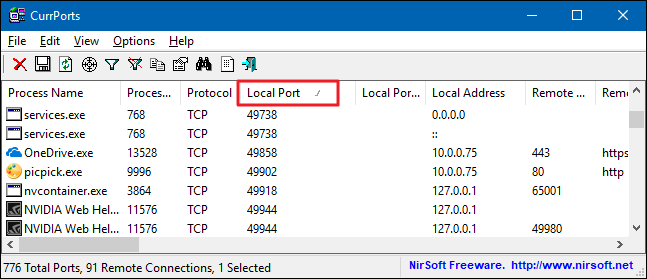
Server applications are usually long lived, while client processes come and go as users run them. Client applications therefore are free to choose almost any port number not used for some other purpose (hence the term "dynamic"), and many use different source port numbers every time they are run. The server has no trouble replying to the proper client because the server can just reverse the source and destination port numbers to send a reply to the correct client . Some malicious software acts as a service, waiting for connections from a remote attacker in order to give them information or control over the machine.

Ports exist either in allow mode, or deny (closed; blocked) mode. If your mail server is in a state of readiness to receive SMTP traffic, we call that "listening on port 25." That means port 25 is open. The main reason you interject a firewall between the Internet and your system is to get in the way of outsiders trying to access open ports. The applications on your network's machines can open ports without waiting for your knowledge or permission.

Some, like peer-to-peer file sharing or video conferencing software, open ports with the single-minded obsession of a frenzied border collie. Each of those open ports becomes another potential hole in your security, gullibly accepting whatever is sent to it, unless you take proactive steps to block it. This knowledge provides you a starting point for figuring out what Internet traffic to permit through the firewall, and what to deny. When connecting to a remote machine via RDP, credentials are stored on that machine and may be retrievable by other users of the systems (e.g. malicious attackers).

Microsoft has added restricted admin mode which instructs the RDP server not to store credentials of users who log in. Behind the scenes, the server now uses 'network' login rather than 'interactive' and therefore uses hashes or Kerberos tickets rather than passwords for authentication. Assessment of the pros and cons of this option are recommended before enabling in your environment.

On the negative side, the use of network login exposes the possibility of credential reuse attacks against the RDP server. Given the pros and cons, avoiding internal escalation of privilege is often prioritized and therefore restricted admin mode is enabled. SYN scan is the default and most popular scan option for good reasons. It can be performed quickly, scanning thousands of ports per second on a fast network not hampered by restrictive firewalls.

It is also relatively unobtrusive and stealthy since it never completes TCP connections. SYN scan works against any compliant TCP stack rather than depending on idiosyncrasies of specific platforms as Nmap's FIN/NULL/Xmas, Maimon and idle scans do. It also allows clear, reliable differentiation between the open,closed, and filteredstates. Most of the scan types are only available to privileged users.This is because they send and receive raw packets,which requires root access on Unix systems. Using an administrator account on Windows is recommended, though Nmap sometimes works for unprivileged users on that platform when Npcap has already been loaded into the OS. Requiring root privileges was a serious limitation when Nmap was released in 1997, as many users only had access to shared shell accounts.
Computers are cheaper, far more people have always-on direct Internet access, and desktop Unix systems are prevalent. A Windows version of Nmap is now available, allowing it to run on even more desktops. For all these reasons, users have less need to run Nmap from limited shared shell accounts.


